<?xml version="1.0" encoding="utf-8"?><feed xmlns="http://www.w3.org/2005/Atom" ><generator uri="https://jekyllrb.com/" version="3.10.0">Jekyll</generator><link href="https://code2motion.github.io/blog/feed.xml" rel="self" type="application/atom+xml" /><link href="https://code2motion.github.io/blog/" rel="alternate" type="text/html" /><updated>2026-03-16T23:05:45+00:00</updated><id>https://code2motion.github.io/blog/feed.xml</id><title type="html">Techy Blog</title><subtitle>Writing about new technologies and how to use them</subtitle><author><name>Nuwan Samarasinghe</name></author><entry><title type="html">Implementing Amazon S3 Malware Protection with GuardDuty in a Control Tower Landing Zone</title><link href="https://code2motion.github.io/blog/blog/aws-s3-malware-detection/" rel="alternate" type="text/html" title="Implementing Amazon S3 Malware Protection with GuardDuty in a Control Tower Landing Zone" /><published>2026-03-16T00:00:00+00:00</published><updated>2026-03-16T00:00:00+00:00</updated><id>https://code2motion.github.io/blog/blog/aws-s3-malware-detection</id><content type="html" xml:base="https://code2motion.github.io/blog/blog/aws-s3-malware-detection/"><![CDATA[<h1 id="what-we-are-going-to-achieve-">What we are going to achieve ?</h1>

<blockquote>
  <p>In this post we are going to discuss about how to implement Gard Duty with S3 in Control Tower environment.</p>
</blockquote>

<hr />

<h2 id="table-of-contents">Table of Contents</h2>

<ul>
  <li><a href="#what-is-control-tower-">What is Control Tower ?</a></li>
  <li><a href="#what-is-gard-duty-">What is Gard Duty ?</a></li>
  <li><a href="#ingress-architecture">Ingress Architecture</a></li>
  <li><a href="#implementation-steps-and-explanation">Implementation steps and explanation</a></li>
  <li><a href="#references">References</a></li>
</ul>

<hr />

<h2 id="what-is-control-tower">What is Control Tower?</h2>

<div style="text-align: justify">
<b>AWS Control Tower</b> is a service that helps organizations <b>set up and manage a secure multi-account AWS environment easily.</b> It provides a simple way to organize AWS accounts, apply governance rules, and follow AWS best practices.
</div>

<div style="text-align: justify">
Large organizations usually need multiple AWS accounts instead of keeping everything in one account. For example, a company may create:
</div>

<ul>
  <li>One account to manage users and identity</li>
  <li>Separate accounts for applications and infrastructure</li>
  <li>Different accounts for development, testing, and production</li>
  <li>Accounts for different departments or teams</li>
</ul>

<p>Using multiple accounts helps with <b>security, isolation, and better management.</b></p>

<div style="text-align: justify">
AWS Control Tower automates this setup. It allows organizations to create, organize, and govern AWS accounts from a central place. It also applies <b>guardrails (rules and policies)</b> to ensure all accounts follow security and compliance standards.
</div>

<div style="text-align: justify">
In short, AWS Control Tower helps organizations build and manage a secure, compliant, and well-governed multi-account AWS environment based on AWS best practices. 
</div>

<h3 id="key-features-of-aws-control-tower">Key Features of AWS Control Tower</h3>

<h4 id="1-landing-zone">1. Landing Zone</h4>

<div style="text-align: justify">
A Landing Zone is a preconfigured multi-account AWS environment that follows AWS best practices. It automatically sets up important components such as:
</div>

<ul>
  <li>AWS Organizations</li>
  <li>Organizational Units (OUs)</li>
  <li>Shared accounts (like logging and security accounts)</li>
  <li>Identity and access management</li>
  <li>Security and compliance configurations</li>
</ul>

<p>This provides a ready-to-use foundation for managing multiple AWS accounts.</p>

<h4 id="2-controls-guardrails">2. Controls (Guardrails)</h4>

<div style="text-align: justify">
Controls, also called Guardrails, enforce rules across AWS accounts to maintain governance and security. Guardrails ensure that accounts follow organizational policies.
There are three types:
</div>

<ul>
  <li>Mandatory – Required controls that cannot be turned off.</li>
  <li>Strongly Recommended – Important security best practices.</li>
  <li>Elective – Optional controls that organizations can enable if needed.</li>
</ul>

<p>Example guardrails include:</p>

<ul>
  <li>Preventing public access to certain resources</li>
  <li>Enforcing encryption</li>
  <li>Restricting specific AWS regions</li>
</ul>

<h4 id="3-account-factory">3. Account Factory</h4>

<div style="text-align: justify">
Account Factory allows organizations to quickly create new AWS accounts.
When a new account is created:
</div>

<ul>
  <li>It is automatically placed in the correct Organizational Unit (OU)</li>
  <li>Security policies and guardrails are applied</li>
  <li>The account follows the organization’s standards</li>
</ul>

<p>This makes it easy to spin up new accounts while maintaining governance and compliance.</p>

<h4 id="4-dashboard">4. Dashboard</h4>

<div style="text-align: justify">
The Control Tower Dashboard provides a central view of all accounts and their compliance status. It shows:
</div>

<ul>
  <li>Which accounts follow the guardrails</li>
  <li>Security and compliance status</li>
  <li>Overall governance of the environment</li>
</ul>

<p>This helps teams monitor and maintain a secure AWS environment.</p>

<hr />

<h2 id="what-is-gard-duty-">What is Gard Duty ?</h2>

<div style="text-align: justify">
Amazon GuardDuty is a security service from AWS that continuously monitors your AWS environment for threats. It helps detect suspicious activity and potential malware across services such as Amazon S3, EC2, IAM, and network traffic.

GuardDuty works as an intelligent threat detection engine. AWS manages the service, so you do not need to install or maintain any infrastructure. It uses machine learning, threat intelligence feeds, and behavioral analysis to identify unusual or malicious activity.

When integrated with Amazon S3, GuardDuty can scan objects for malware. Once enabled, it automatically checks newly uploaded files in your S3 buckets. GuardDuty temporarily accesses the object, scans it for known malware patterns, and then adds tags based on the results.

If GuardDuty detects an infected object, you can trigger automated actions. For example, you can:

</div>

<ul>
  <li>Move the file to a quarantine bucket</li>
  <li>Block access to the object</li>
  <li>Notify security teams</li>
  <li>Automatically delete the infected file</li>
</ul>

<div style="text-align: justify">
These actions can be implemented using AWS services such as EventBridge, Lambda, or Step Functions.

This approach helps isolate infected files without impacting your applications or other data stored in S3. Your application can continue running while the security workflow handles the threat in the background.

Many large organizations use GuardDuty because it provides managed security monitoring with minimal operational effort. AWS continuously updates its threat detection models and malware signatures, so your environment stays protected without manual updates.
</div>

<h3 id="s3-gard-duty-limitations">S3 Gard Duty Limitations</h3>

<table>
  <thead>
    <tr>
      <th>Quata Name</th>
      <th>value</th>
    </tr>
  </thead>
  <tbody>
    <tr>
      <td>Maximum protected buckets</td>
      <td>25</td>
    </tr>
    <tr>
      <td>Maximum archive depth levels</td>
      <td>5</td>
    </tr>
    <tr>
      <td>Extracted archive files</td>
      <td>10,000</td>
    </tr>
    <tr>
      <td>Extracted archive bytes</td>
      <td>100 GB</td>
    </tr>
    <tr>
      <td>Maximum S3 object size</td>
      <td>100 GB</td>
    </tr>
  </tbody>
</table>

<hr />

<h2 id="ingress-architecture">Ingress Architecture</h2>

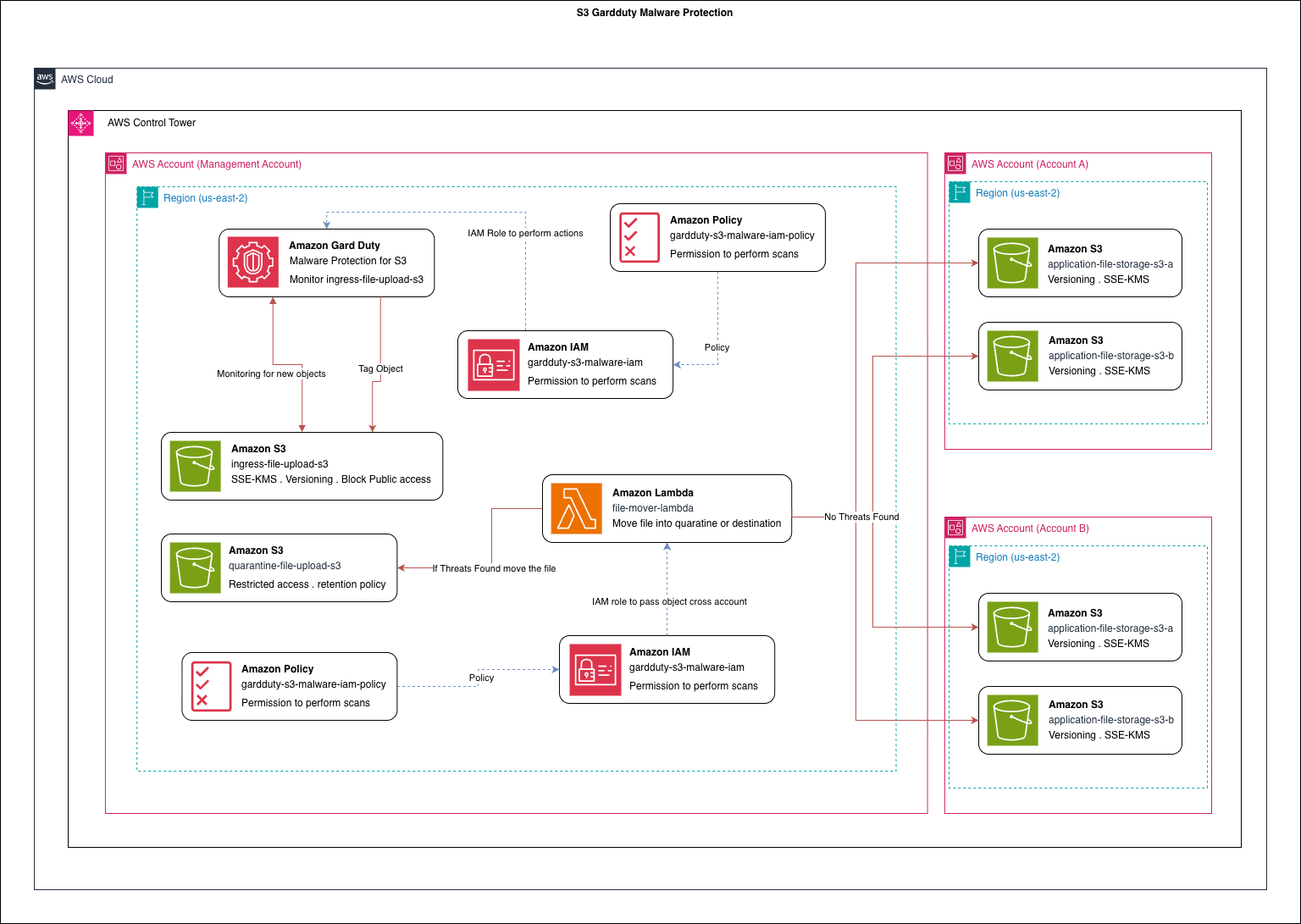
<p><img src="/blog/assets/images/blog/2026-03-16/s3-gardduty.png" alt="Architecture Diagram" title="Architecture Diagram" /></p>

<div style="text-align: justify">
In this discussion, we will explore an <b>ingress pattern for implementing malware detection using Amazon GuardDuty with Amazon S3.</b>
</div>

<div style="text-align: justify">
Currently, GuardDuty Malware Protection for S3 has a <b>limit of protecting 25 buckets per AWS account</b>, and this limit cannot be increased. Because of this restriction, protecting a large number of application buckets directly is not practical. To solve this limitation, I designed an ingress pattern that allows us to scan uploaded files while keeping the number of protected S3 buckets small.
</div>

<h3 id="ingress-bucket-design">Ingress Bucket Design</h3>

<div style="text-align: justify">
In this design, we create a small set of S3 buckets that act as ingress buckets. All file uploads must go through one of these ingress buckets. Since GuardDuty protection is enabled only on these buckets, we stay within the 25-bucket limit while still scanning all uploaded files.
</div>

<div style="text-align: justify">
To further improve security and hide the internal architecture, we can place Amazon API Gateway in front of the upload process instead of directly exposing S3 using presigned URLs. With API Gateway we can:
</div>

<ul>
  <li>Add authentication and authorization</li>
  <li>Control access using API keys, IAM, or JWT tokens</li>
  <li>Hide the underlying S3 bucket structure from clients</li>
</ul>

<div style="text-align: justify">
However, this approach may limit some native S3 capabilities such as streaming uploads or direct multipart uploads. For this discussion, we will not focus on those limitations because the primary goal is to improve security for file upload services.
</div>

<h3 id="why-use-guardduty-malware-protection">Why Use GuardDuty Malware Protection?</h3>

<div style="text-align: justify">
In a typical service implementation, organizations often add custom antivirus or malware scanning services. These solutions usually rely on third-party tools or self-managed scanning systems. While they work, they introduce additional operational overhead such as:
</div>

<ul>
  <li>Managing scanning infrastructure</li>
  <li>Updating malware signatures</li>
  <li>Monitoring and scaling the service</li>
  <li>Maintaining security patches</li>
</ul>

<div style="text-align: justify">
Using GuardDuty Malware Protection for S3 significantly reduces this operational burden. Since it is an AWS managed service, AWS handles:
</div>

<ul>
  <li>Infrastructure management</li>
  <li>Malware signature updates</li>
  <li>Service scaling</li>
  <li>Continuous improvements to detection capabilities</li>
</ul>

<div style="text-align: justify">
Additionally, AWS continuously improves GuardDuty and may introduce advanced detection features such as AI-assisted malware analysis.
</div>

<h3 id="file-processing-workflow">File Processing Workflow</h3>

<div style="text-align: justify">
In this implementation, we reduce the number of S3 buckets that require protection and centralize scanning through the ingress buckets.

The workflow looks like this:
</div>

<ol>
  <li>A client uploads a file to an Ingress S3 bucket.</li>
  <li>GuardDuty Malware Protection automatically scans the object.</li>
  <li>If a threat is detected, the file is:
    <ul>
      <li>Isolated</li>
      <li>Moved to a quarantine bucket</li>
    </ul>
  </li>
  <li>If no malware is detected, the file is considered safe.</li>
  <li>Based on the object metadata, the file is then transferred to another S3 bucket in a different account, where it will be used by downstream services for further processing.</li>
</ol>

<div style="text-align: justify">
At the moment, this design does not include a retry or remediation mechanism for files flagged as malicious. In future improvements, I plan to add additional automation such as:
</div>

<ul>
  <li>Automated alerts</li>
  <li>Security notifications</li>
  <li>Optional re-scanning or manual review workflows</li>
</ul>

<h3 id="multi-account-architecture">Multi-Account Architecture</h3>

<div style="text-align: justify">
To make this example more realistic and closer to a real enterprise environment, I used AWS Control Tower to create a multi-account organizational structure.

This approach reflects how many organizations structure their cloud environments, separating workloads into different accounts such as:
</div>

<ul>
  <li>Management account</li>
  <li>Account A</li>
  <li>Account B</li>
</ul>

<div style="text-align: justify">
In this implementation, the scanned and validated files are passed to an S3 bucket in another account where the application services run.
</div>

<h3 id="what-this-series-will-cover">What This Series Will Cover</h3>

<div style="text-align: justify">
In this first discussion, I introduced the Ingress Pattern for secure file uploads with GuardDuty malware scanning.

In the next steps of this series:
</div>

<ul>
  <li>
    <p>I will publish a video walkthrough showing how to implement this architecture using the AWS Console.</p>
  </li>
  <li>
    <p>After that, I will provide a Terraform script that can automatically deploy the entire environment.</p>
  </li>
  <li>
    <p>This will allow anyone to reproduce the architecture easily and experiment with the pattern.</p>
  </li>
</ul>

<hr />

<h2 id="references">References</h2>

<ul>
  <li><a href="https://docs.aws.amazon.com/controltower/latest/userguide/what-is-control-tower.html">AWS Docs - Control tower</a></li>
  <li><a href="https://docs.aws.amazon.com/guardduty/latest/ug/gdu-malware-protection-s3.html">Gard Duty</a></li>
  <li><a href="https://docs.aws.amazon.com/guardduty/latest/ug/malware-protection-s3-quotas-guardduty.html">Gard Duty Limitations</a></li>
</ul>]]></content><author><name>Nuwan Samarasinghe</name></author><category term="blog" /><category term="aws" /><summary type="html"><![CDATA[In this post we are going to discuss about how to implement Gard Duty with S3 in Control Tower environment.]]></summary></entry><entry><title type="html">Liquibase Implementation With Springboot Hibernate</title><link href="https://code2motion.github.io/blog/blog/liquibase-springboot-post/" rel="alternate" type="text/html" title="Liquibase Implementation With Springboot Hibernate" /><published>2025-09-25T00:00:00+01:00</published><updated>2025-09-25T00:00:00+01:00</updated><id>https://code2motion.github.io/blog/blog/liquibase-springboot-post</id><content type="html" xml:base="https://code2motion.github.io/blog/blog/liquibase-springboot-post/"><![CDATA[<h1 id="liquibase-implementation-with-springboot-hibernate">Liquibase Implementation With Springboot Hibernate</h1>

<blockquote>
  <p>In this post, we’ll explore a high-level implementation of Liquibase with Spring Boot and Jpa, using Hibernate for database interactions.</p>
</blockquote>

<hr />

<h2 id="table-of-contents">Table of Contents</h2>

<ul>
  <li><a href="#what-is-liquibase-?">What is liquibase ?</a></li>
  <li><a href="#liquibase-with-gradle">Liquibase with gradle</a></li>
  <li><a href="#autogenerate-diff-and-how-to-metion-it-in-the-springboot-to-auto-upgrade-db-?s">Autogenerate diff and how to metion it in the springboot to auto upgrade db ?</a></li>
  <li><a href="#how-to-upgrade-or-downgrade-with-liquibase">How to upgrade or downgrade with liquibase</a></li>
  <li><a href="#liquibase-limitations-compared-to-other-language-migrations">Liquibase limitations compared to other language migrations</a></li>
  <li><a href="#final-thoughts">Final thoughts</a></li>
</ul>

<hr />

<h2 id="what-is-liquibase-">What is liquibase ?</h2>

<p>Liquibase is a database migration management tool that helps you manage and track changes to your database in a safe and controlled way. It integrates well with Spring Boot and other frameworks, ensuring that schema updates are consistent across environments. Every change you make whether it’s adding a column, creating a table, or modifying data is stored in change scripts, which also serve as a historical record of what was changed and when.</p>

<p>Liquibase supports multiple formats for writing these change scripts, including YAML, SQL, XML, and JSON. This flexibility allows teams to choose whichever format they’re most comfortable with. Once defined, these scripts can be version controlled along with your application code, ensuring database and application changes are deployed together.</p>

<p>Another key benefit is its ability to both apply (upgrade) and roll back (downgrade) changes. If a deployment introduces issues, you can revert to a previous state, as long as rollback scripts are provided. This makes Liquibase especially valuable in CI/CD pipelines, where reliable and reversible database migrations are critical for smooth delivery.</p>

<h2 id="liquibase-with-gradle">Liquibase with gradle</h2>

<p>In this series of blog posts, I’m exploring how to use Liquibase with Spring Boot, leveraging the Gradle Liquibase plugin and the necessary dependencies. During discussions with other developers, I realized that Liquibase comes with a few technical challenges compared to database management tools in other languages. For example, Python’s Flask with SQLAlchemy feels more developer-friendly in some ways, because it can automatically detect ORM model changes and generate both upgrade and downgrade SQL scripts based on previous migrations. With Liquibase, this process isn’t always as straightforward, and when I tried implementing it, a few things were unclear.</p>

<p>In this article, I plan to shed light on some of those hidden details and share the issues I faced while working with Liquibase. I’ll also welcome feedback—if I’ve misunderstood or done something incorrectly, please feel free to point it out in the discussion section. I intend to update this blog based on your comments so that others can benefit from a more accurate picture.</p>

<p>One of the first hurdles I encountered was figuring out the right dependencies when using the Gradle Liquibase plugin. It took quite a bit of trial and error to land on a working combination, as certain versions produced strange or inconsistent errors. Eventually, I managed to identify a set of compatible versions and got a working example up and running, which I’ll also share here.</p>

<h4 id="what-does-liquibase-gradle-plugin-do-">What does Liquibase gradle plugin do ?</h4>

<p>The Gradle Liquibase Plugin integrates Liquibase directly into the Gradle build lifecycle, allowing database change management tasks to be executed within the Gradle environment. With this plugin, developers can generate, apply, and roll back database schema changes using simple Gradle commands—removing the need to run Liquibase separately.</p>

<p>Key capabilities include:</p>

<ol>
  <li>Running Liquibase commands (update, rollback, status, validate, diff, etc.) through Gradle tasks.</li>
  <li>Generating and executing database upgrade and downgrade scripts.</li>
  <li>Managing changelogs and ensuring consistent schema versioning across environments.</li>
  <li>Seamlessly integrating database migrations into CI/CD pipelines via Gradle tasks.</li>
  <li>Supporting multiple database environments (e.g., dev, test, prod) with configurable properties.</li>
  <li>Ensuring database state remains in sync with application releases.</li>
</ol>

<p>In short, the plugin brings Liquibase into the Gradle workflow, enabling unified build and database version control from a single environment.</p>

<p>While using this plugin, I faced a few drawbacks. One challenge was finding the exact matching Liquibase dependencies required to enable the Gradle plugin. There isn’t much documentation about which dependencies to use with the latest versions, so I had to figure it out through trial and error. Eventually, I found a combination that worked for me, but there may be other reliable sources where we can find the right dependencies.</p>

<p>Gradle plugin gradle version I have used</p>

<div class="language-gradle highlighter-rouge"><div class="highlight"><pre class="highlight"><code><span class="n">id</span> <span class="s1">'org.liquibase.gradle'</span> <span class="n">version</span> <span class="s2">"3.0.2"</span>
</code></pre></div></div>

<p>Other dependencies that required</p>

<div class="language-gradle highlighter-rouge"><div class="highlight"><pre class="highlight"><code><span class="n">liquibaseRuntime</span> <span class="s1">'org.liquibase:liquibase-core:4.26.0'</span>
<span class="n">liquibaseRuntime</span> <span class="s1">'org.liquibase:liquibase-groovy-dsl:3.0.2'</span>
<span class="n">liquibaseRuntime</span> <span class="s1">'info.picocli:picocli:4.6.1'</span>
<span class="n">liquibaseRuntime</span> <span class="s1">'org.liquibase.ext:liquibase-hibernate6:4.26.0'</span>
<span class="n">liquibaseRuntime</span> <span class="s1">'org.postgresql:postgresql:42.7.4'</span>
<span class="n">liquibaseRuntime</span> <span class="nf">files</span><span class="o">(</span><span class="k">sourceSets</span><span class="o">.</span><span class="na">main</span><span class="o">.</span><span class="na">output</span><span class="o">)</span>

<span class="n">implementation</span> <span class="s1">'org.liquibase:liquibase-core:4.26.0'</span>
</code></pre></div></div>

<p>In my setup, I added the Spring Boot Liquibase dependency so that any changes added to the changelog are automatically detected and applied to the database when the application starts. This is convenient for local development, but in production you should disable automatic updates to avoid unintended schema changes. Here we use two dependency configurations: <code class="language-plaintext highlighter-rouge">liquibaseRuntime</code> for the Gradle Liquibase plugin, and <code class="language-plaintext highlighter-rouge">implementation</code> for Spring Boot. The first is required for running Liquibase commands through Gradle, while the second ensures Spring Boot can pick up Liquibase at runtime.</p>

<p>I also added liquibaseRuntime files(sourceSets.main.output) as a dependency. This tells the Liquibase Gradle plugin to include the compiled output of the main source set (for example, <code class="language-plaintext highlighter-rouge">build/classes/java/main</code> and resources like <code class="language-plaintext highlighter-rouge">src/main/resources</code>) on the Liquibase runtime classpath. By doing this, Liquibase can detect changes in the database models and generate an update changelog (diff) with the latest schema modifications. However, it does not generate downgrade scripts automatically. According to the documentation, this is by design Liquibase avoids auto-generating rollbacks to reduce the risk of accidental data loss. Instead, developers are expected to write rollback scripts manually when needed.</p>

<div class="language-gradle highlighter-rouge"><div class="highlight"><pre class="highlight"><code><span class="n">configurations</span> <span class="o">{</span>
  <span class="n">liquibaseRuntime</span><span class="o">.</span><span class="na">extendsFrom</span> <span class="n">runtimeClasspath</span>
<span class="o">}</span>
</code></pre></div></div>

<p>This is needed because the Liquibase Gradle plugin runs in its own configuration (liquibaseRuntime), separate from the application’s runtimeClasspath. By default, Liquibase tasks won’t know about the dependencies we have already declared for the app (like JDBC drivers, Hibernate, or Spring Data). Extending liquibaseRuntime from runtimeClasspath makes sure all the libraries available at runtime for the application are also available to Liquibase when it executes. Without this, Liquibase might fail to connect to the database or to detect changes in entities, since it wouldn’t have the necessary classes and drivers on its classpath.</p>

<div class="language-gradle highlighter-rouge"><div class="highlight"><pre class="highlight"><code><span class="n">liquibase</span> <span class="o">{</span>
  <span class="n">runList</span> <span class="o">=</span> <span class="s1">'main'</span>
  <span class="n">activities</span> <span class="o">{</span>
    <span class="n">main</span> <span class="o">{</span>
      <span class="n">changelogFile</span> <span class="s2">"db/changelog/db.changelog-master.yml"</span>
      <span class="n">url</span> <span class="s2">"jdbc:postgresql://localhost:5432/budget_wise"</span>
      <span class="n">username</span> <span class="s2">"budget_wise"</span>
      <span class="n">password</span> <span class="s2">"budget_wise"</span>
      <span class="n">outputSchemas</span> <span class="s2">"public"</span>
      <span class="n">includeSchema</span> <span class="kc">false</span>
      <span class="n">referenceUrl</span> <span class="s2">"""hibernate:spring:com.budgetwise,com.budgetwise.backend.models
        ?dialect=org.hibernate.dialect.PostgreSQLDialect
        &amp;hibernate.default_schema=public
        &amp;hibernate.physical_naming_strategy=org.hibernate.boot.model.naming.CamelCaseToUnderscoresNamingStrategy
        &amp;hibernate.implicit_naming_strategy=org.springframework.boot.orm.jpa.hibernate.SpringImplicitNamingStrategy"""</span>
    <span class="o">}</span>
  <span class="o">}</span>
<span class="o">}</span>
</code></pre></div></div>

<p>This Gradle configuration defines a main Liquibase activity and tells the plugin how to connect to the database and where to find the changelog (db/changelog/db.changelog-master.yml). The JDBC URL, username, and password let Liquibase log in and apply changes when you run update. The referenceUrl uses the Liquibase Hibernate integration to point at your Java packages; it’s used for diff/generateChangeLog so Liquibase can compare your Hibernate entities to the database and produce a changeset. The query parameters set the PostgreSQL dialect, default schema, and naming strategies so Hibernate maps names the same way your app does, which yields accurate diffs. Options like outputSchemas and includeSchema scope and format the generated output. Since this example targets PostgreSQL, the config specifies the Postgres dialect. For security and portability, avoid hardcoding credentials use Gradle properties or environment variables instead.</p>

<p>Following is the Example spring boot configuration that can be used <a href="https://github.com/nuwan-samarasinghe/budget-wise/blob/main/backend/build.gradle">Example Project</a></p>

<div class="language-gradle highlighter-rouge"><div class="highlight"><pre class="highlight"><code><span class="k">buildscript</span> <span class="o">{</span>
  <span class="k">repositories</span> <span class="o">{</span>
    <span class="n">mavenCentral</span><span class="o">()</span>
  <span class="o">}</span>
  <span class="k">dependencies</span> <span class="o">{</span>
    <span class="n">classpath</span> <span class="s1">'org.liquibase:liquibase-core:4.26.0'</span>
  <span class="o">}</span>
<span class="o">}</span>

<span class="n">plugins</span> <span class="o">{</span>
	<span class="n">id</span> <span class="s1">'java'</span>
	<span class="n">id</span> <span class="s1">'org.springframework.boot'</span> <span class="n">version</span> <span class="s1">'3.5.3'</span>
	<span class="n">id</span> <span class="s1">'io.spring.dependency-management'</span> <span class="n">version</span> <span class="s1">'1.1.7'</span>
	<span class="n">id</span> <span class="s1">'com.diffplug.spotless'</span> <span class="n">version</span> <span class="s1">'6.25.0'</span>
	<span class="n">id</span> <span class="s2">"org.sonarqube"</span> <span class="n">version</span> <span class="s2">"6.2.0.5505"</span>
	<span class="n">id</span> <span class="s1">'jacoco'</span>
  <span class="n">id</span> <span class="s1">'org.liquibase.gradle'</span> <span class="n">version</span> <span class="s2">"3.0.2"</span>
<span class="o">}</span>

<span class="n">group</span> <span class="o">=</span> <span class="s1">'com.budgetwise'</span>
<span class="n">version</span> <span class="o">=</span> <span class="s1">'0.0.1-SNAPSHOT'</span>

<span class="n">java</span> <span class="o">{</span>
	<span class="n">toolchain</span> <span class="o">{</span>
		<span class="n">languageVersion</span> <span class="o">=</span> <span class="n">JavaLanguageVersion</span><span class="o">.</span><span class="na">of</span><span class="o">(</span><span class="mi">21</span><span class="o">)</span>
	<span class="o">}</span>
	<span class="n">sourceCompatibility</span> <span class="o">=</span> <span class="n">JavaVersion</span><span class="o">.</span><span class="na">VERSION_21</span>
    <span class="n">targetCompatibility</span> <span class="o">=</span> <span class="n">JavaVersion</span><span class="o">.</span><span class="na">VERSION_21</span>
<span class="o">}</span>

<span class="n">spotless</span> <span class="o">{</span>
    <span class="n">java</span> <span class="o">{</span>
        <span class="n">googleJavaFormat</span><span class="o">()</span>
        <span class="n">eclipse</span><span class="o">()</span>
        <span class="n">removeUnusedImports</span><span class="o">()</span>
        <span class="n">trimTrailingWhitespace</span><span class="o">()</span>
        <span class="n">endWithNewline</span><span class="o">()</span>
    <span class="o">}</span>
<span class="o">}</span>

<span class="n">jacoco</span> <span class="o">{</span>
    <span class="n">toolVersion</span> <span class="o">=</span> <span class="s2">"0.8.11"</span>
<span class="o">}</span>

<span class="n">jacocoTestReport</span> <span class="o">{</span>
    <span class="n">dependsOn</span> <span class="n">test</span>

    <span class="n">reports</span> <span class="o">{</span>
        <span class="n">xml</span><span class="o">.</span><span class="na">required</span> <span class="o">=</span> <span class="kc">true</span>
        <span class="n">csv</span><span class="o">.</span><span class="na">required</span> <span class="o">=</span> <span class="kc">false</span>
        <span class="n">html</span><span class="o">.</span><span class="na">outputLocation</span> <span class="o">=</span> <span class="n">layout</span><span class="o">.</span><span class="na">buildDirectory</span><span class="o">.</span><span class="na">dir</span><span class="o">(</span><span class="s1">'jacocoHtml'</span><span class="o">)</span>
    <span class="o">}</span>
<span class="o">}</span>

<span class="n">jacocoTestCoverageVerification</span> <span class="o">{</span>
    <span class="n">dependsOn</span> <span class="n">jacocoTestReport</span>
    <span class="n">violationRules</span> <span class="o">{</span>
        <span class="n">rule</span> <span class="o">{</span>
            <span class="n">limit</span> <span class="o">{</span>
                <span class="n">minimum</span> <span class="o">=</span> <span class="mf">0.80</span>
            <span class="o">}</span>
        <span class="o">}</span>
    <span class="o">}</span>
<span class="o">}</span>

<span class="n">configurations</span> <span class="o">{</span>
    <span class="n">developmentOnly</span>
    <span class="n">runtimeClasspath</span> <span class="o">{</span>
        <span class="n">extendsFrom</span> <span class="n">developmentOnly</span>
    <span class="o">}</span>
<span class="o">}</span>

<span class="n">bootRun</span> <span class="o">{</span>
    <span class="n">jvmArgs</span> <span class="o">=</span> <span class="o">[</span>
        <span class="s2">"-agentlib:jdwp=transport=dt_socket,server=y,suspend=n,address=*:5005"</span>
    <span class="o">]</span>
	<span class="n">sourceResources</span> <span class="k">sourceSets</span><span class="o">.</span><span class="na">main</span>
<span class="o">}</span>

<span class="n">sonar</span> <span class="o">{</span>
  <span class="n">properties</span> <span class="o">{</span>
    <span class="n">property</span> <span class="s2">"sonar.projectKey"</span><span class="o">,</span> <span class="s2">"budget-wise-backend"</span>
    <span class="n">property</span> <span class="s2">"sonar.organization"</span><span class="o">,</span> <span class="s2">"nuwan-samarasinghe"</span>
    <span class="n">property</span> <span class="s2">"sonar.host.url"</span><span class="o">,</span> <span class="s2">"https://sonarcloud.io"</span>
	<span class="n">property</span> <span class="s2">"sonar.java.binaries"</span><span class="o">,</span> <span class="s2">"build/classes/java/main"</span>
	<span class="n">property</span> <span class="s2">"sonar.coverage.jacoco.xmlReportPaths"</span><span class="o">,</span> <span class="s2">"${buildDir}/reports/jacoco/test/jacocoTestReport.xml"</span>
  <span class="o">}</span>
<span class="o">}</span>

<span class="k">repositories</span> <span class="o">{</span>
	<span class="n">mavenCentral</span><span class="o">()</span>
	<span class="n">maven</span> <span class="o">{</span> <span class="n">url</span> <span class="o">=</span> <span class="s1">'https://repo.spring.io/milestone'</span> <span class="o">}</span>
	<span class="n">maven</span> <span class="o">{</span> <span class="n">url</span> <span class="o">=</span> <span class="s1">'https://repo.spring.io/snapshot'</span> <span class="o">}</span>
<span class="o">}</span>

<span class="n">configurations</span> <span class="o">{</span>
  <span class="n">liquibaseRuntime</span><span class="o">.</span><span class="na">extendsFrom</span> <span class="n">runtimeClasspath</span>
<span class="o">}</span>

<span class="k">dependencies</span> <span class="o">{</span>
	<span class="n">implementation</span> <span class="s1">'org.springframework.boot:spring-boot-starter-actuator'</span>
	<span class="n">implementation</span> <span class="s1">'org.springframework.boot:spring-boot-starter-data-jpa'</span>
	<span class="n">implementation</span> <span class="s1">'org.springframework.boot:spring-boot-starter-security'</span>
	<span class="n">implementation</span> <span class="s1">'org.springframework.boot:spring-boot-starter-validation'</span>
	<span class="n">implementation</span> <span class="s1">'org.springframework.boot:spring-boot-starter-web'</span>
  <span class="n">implementation</span> <span class="s1">'org.liquibase:liquibase-core:4.26.0'</span>
  <span class="n">implementation</span> <span class="s1">'org.springframework.boot:spring-boot-starter-aop'</span>
  <span class="n">implementation</span> <span class="s1">'org.modelmapper:modelmapper:3.2.4'</span>
  <span class="n">implementation</span> <span class="s1">'org.springdoc:springdoc-openapi-starter-webmvc-ui:2.8.9'</span>
  <span class="n">liquibaseRuntime</span> <span class="s1">'org.liquibase:liquibase-core:4.26.0'</span>
  <span class="n">liquibaseRuntime</span> <span class="s1">'org.liquibase:liquibase-groovy-dsl:3.0.2'</span>
  <span class="n">liquibaseRuntime</span> <span class="s1">'info.picocli:picocli:4.6.1'</span>
  <span class="n">liquibaseRuntime</span> <span class="s1">'org.liquibase.ext:liquibase-hibernate6:4.26.0'</span>
  <span class="n">liquibaseRuntime</span> <span class="s1">'org.postgresql:postgresql:42.7.4'</span>
  <span class="n">liquibaseRuntime</span> <span class="nf">files</span><span class="o">(</span><span class="k">sourceSets</span><span class="o">.</span><span class="na">main</span><span class="o">.</span><span class="na">output</span><span class="o">)</span>
	<span class="n">runtimeOnly</span> <span class="s1">'org.postgresql:postgresql'</span>
	<span class="n">compileOnly</span> <span class="s1">'org.projectlombok:lombok'</span>
  <span class="n">implementation</span> <span class="s1">'io.jsonwebtoken:jjwt-api:0.12.6'</span>
  <span class="n">runtimeOnly</span> <span class="s1">'io.jsonwebtoken:jjwt-impl:0.12.6'</span>
  <span class="n">runtimeOnly</span> <span class="s1">'io.jsonwebtoken:jjwt-jackson:0.12.6'</span>
	<span class="n">annotationProcessor</span> <span class="s1">'org.projectlombok:lombok'</span>
	<span class="n">testImplementation</span> <span class="s1">'org.springframework.boot:spring-boot-starter-test'</span>
	<span class="n">testImplementation</span> <span class="s1">'org.springframework.boot:spring-boot-testcontainers'</span>
	<span class="n">testImplementation</span> <span class="s1">'org.springframework.security:spring-security-test'</span>
	<span class="n">testImplementation</span> <span class="s1">'org.testcontainers:junit-jupiter'</span>
	<span class="n">testImplementation</span> <span class="s1">'org.testcontainers:postgresql'</span>
	<span class="n">testImplementation</span> <span class="s1">'net.datafaker:datafaker:2.4.3'</span>
	<span class="n">testRuntimeOnly</span> <span class="s1">'org.junit.platform:junit-platform-launcher'</span>
	<span class="n">developmentOnly</span> <span class="s1">'org.springframework.boot:spring-boot-devtools'</span>
<span class="o">}</span>

<span class="n">tasks</span><span class="o">.</span><span class="na">withType</span><span class="o">(</span><span class="n">org</span><span class="o">.</span><span class="na">liquibase</span><span class="o">.</span><span class="na">gradle</span><span class="o">.</span><span class="na">LiquibaseTask</span><span class="o">).</span><span class="na">configureEach</span> <span class="o">{</span>
  <span class="n">dependsOn</span><span class="o">(</span><span class="s2">"classes"</span><span class="o">)</span>
<span class="o">}</span>

<span class="n">tasks</span><span class="o">.</span><span class="na">register</span><span class="o">(</span><span class="s2">"printLiquibaseRuntime"</span><span class="o">)</span> <span class="o">{</span>
  <span class="n">doLast</span> <span class="o">{</span>
    <span class="n">configurations</span><span class="o">.</span><span class="na">liquibaseRuntime</span><span class="o">.</span><span class="na">resolve</span><span class="o">().</span><span class="na">each</span> <span class="o">{</span> <span class="n">println</span> <span class="n">it</span> <span class="o">}</span>
  <span class="o">}</span>
<span class="o">}</span>

<span class="n">liquibase</span> <span class="o">{</span>
  <span class="n">runList</span> <span class="o">=</span> <span class="s1">'main'</span>
  <span class="n">activities</span> <span class="o">{</span>
    <span class="n">main</span> <span class="o">{</span>
      <span class="n">changelogFile</span> <span class="s2">"db/changelog/db.changelog-master.yml"</span>
      <span class="n">url</span> <span class="s2">"jdbc:postgresql://localhost:5432/budget_wise"</span>
      <span class="n">username</span> <span class="s2">"budget_wise"</span>
      <span class="n">password</span> <span class="s2">"budget_wise"</span>
      <span class="n">outputSchemas</span> <span class="s2">"public"</span>
      <span class="n">includeSchema</span> <span class="kc">false</span>
      <span class="n">referenceUrl</span> <span class="s2">"""hibernate:spring:com.budgetwise,com.budgetwise.backend.models
        ?dialect=org.hibernate.dialect.PostgreSQLDialect
        &amp;hibernate.default_schema=public
        &amp;hibernate.physical_naming_strategy=org.hibernate.boot.model.naming.CamelCaseToUnderscoresNamingStrategy
        &amp;hibernate.implicit_naming_strategy=org.springframework.boot.orm.jpa.hibernate.SpringImplicitNamingStrategy"""</span>
    <span class="o">}</span>
  <span class="o">}</span>
<span class="o">}</span>

<span class="n">tasks</span><span class="o">.</span><span class="na">named</span><span class="o">(</span><span class="s1">'test'</span><span class="o">)</span> <span class="o">{</span>
	<span class="n">useJUnitPlatform</span><span class="o">()</span>
	<span class="n">testLogging</span> <span class="o">{</span>
        <span class="n">events</span> <span class="s2">"passed"</span><span class="o">,</span> <span class="s2">"skipped"</span><span class="o">,</span> <span class="s2">"failed"</span>
    <span class="o">}</span>
<span class="o">}</span>

<span class="n">check</span><span class="o">.</span><span class="na">dependsOn</span> <span class="n">jacocoTestCoverageVerification</span>

</code></pre></div></div>

<h2 id="autogenerate-diff-and-how-to-metion-it-in-the-springboot-to-auto-upgrade-db-">Autogenerate diff and how to metion it in the springboot to auto upgrade db ?</h2>

<p>To auto-generate the initial changelog, I run:</p>

<div class="language-sh highlighter-rouge"><div class="highlight"><pre class="highlight"><code>./gradlew generateChangelog <span class="nt">-PliquibaseChangelogFile</span><span class="o">=</span>src/main/resources/db/changelog/db.changelog-master.yml
</code></pre></div></div>
<p>This tells Liquibase (via the Gradle plugin) to scan my reference model (Hibernate, per my referenceUrl) and the target database, then write the “main” changelog to db.changelog-master.yml. I treat this as the baseline of my schema.</p>

<p>After that baseline exists, anytime I change my entities, I generate a new, timestamped changeset with:</p>
<div class="language-sh highlighter-rouge"><div class="highlight"><pre class="highlight"><code>./gradlew clean classes <span class="o">&amp;&amp;</span> ./gradlew diffChangelog <span class="nt">-PliquibaseChangelogFile</span><span class="o">=</span>src/main/resources/db/changelog/changesets/<span class="si">$(</span><span class="nb">date</span> +%Y-%m-%d-%H%M<span class="si">)</span>.yml
</code></pre></div></div>
<p>I run clean classes first so the compiled classes match my latest code; otherwise the diff might be stale. diffChangelog compares the updated model to the current database and outputs only the differences into a new changeset file named with the current date/time. I then review and, if needed, add explicit rollback blocks before committing.</p>

<p>In Spring Boot, I use these properties:</p>
<div class="language-plaintext highlighter-rouge"><div class="highlight"><pre class="highlight"><code>spring.jpa.hibernate.ddl-auto=validate
spring.liquibase.enabled=true
spring.liquibase.change-log=classpath:db/changelog/db.changelog-master.yml
</code></pre></div></div>
<ul>
  <li><code class="language-plaintext highlighter-rouge">ddl-auto=validate</code> makes Hibernate check the schema rather than auto-create/update it, so Liquibase remains the single source of truth.</li>
  <li><code class="language-plaintext highlighter-rouge">spring.liquibase.enabled=true</code> lets Spring Boot run Liquibase on startup (great for local/dev).</li>
  <li><code class="language-plaintext highlighter-rouge">change-log</code> points Boot to my master changelog, which can include the generated changesets.</li>
</ul>

<p>A few tips:</p>

<ul>
  <li>Keep credentials and JDBC URLs out of build files; use Gradle properties or environment variables.</li>
  <li>Don’t rely on Boot auto-updates in production—run Liquibase via Gradle/CI instead.</li>
  <li>Always review generated diffs and write rollbacks manually where appropriate.</li>
</ul>

<h2 id="how-to-upgrade-or-downgrade-with-liquibase">How to upgrade or downgrade with liquibase</h2>

<p>To apply (upgrade) the database to the latest version defined in your changelogs, I simply run:</p>

<div class="language-sh highlighter-rouge"><div class="highlight"><pre class="highlight"><code>./gradlew update
</code></pre></div></div>
<p>This tells Liquibase to look at the current state of the database, compare it with the changelogs, and then apply any new changesets that haven’t been executed yet. It’s the most common command and is what keeps the database schema in sync with my code.</p>

<p>Downgrading (rolling back) works a little differently. Liquibase doesn’t auto-generate downgrade scripts for safety reasons—you need to define explicit rollback instructions inside your changesets. For example:</p>

<p>Roll back the last changeset that was applied:</p>

<div class="language-sh highlighter-rouge"><div class="highlight"><pre class="highlight"><code>./gradlew rollbackCount <span class="nt">-PliquibaseCommandValue</span><span class="o">=</span>1
</code></pre></div></div>

<p>Using the following way we can add a rollback block in your changeset</p>

<h2 id="liquibase-limitations-compared-to-other-language-migrations">Liquibase limitations compared to other language migrations</h2>

<p>I’ve spent a few years with Python/Flask using SQLAlchemy, where Alembic handled migrations. In that world, I didn’t have to spell out every change by hand Alembic could autogenerate upgrade/downgrade scripts from model diffs, assign version numbers, and let me roll back to a specific revision. Autogeneration wasn’t perfect, but with a thorough review it usually worked.</p>

<p>With Liquibase in a Spring/Gradle setup, the model is different. Liquibase is declarative and prefers explicit changesets. I can still use the Hibernate integration to diff my entities against the database and generate new changesets, but rollbacks aren’t fully auto-generated. Liquibase supports the rollback command, but it only works automatically when a change type is inherently reversible or when I provide an explicit <rollback> block. Because of that, I treat rollback content as something I author on purpose—that’s safer, but it feels less hands-off compared to Alembic. Also, to detect model changes from Java, I need the extra Gradle/Liquibase config (e.g., referenceUrl, liquibase-hibernate extension, and including compiled classes on the Liquibase classpath), which is a bit more setup than Alembic’s usual flow.</rollback></p>]]></content><author><name>Nuwan Samarasinghe</name></author><category term="blog" /><category term="springboot" /><category term="hibernate" /><category term="liquibase" /><category term="database" /><summary type="html"><![CDATA[In this post, we’ll explore a high-level implementation of Liquibase with Spring Boot and Jpa, using Hibernate for database interactions.]]></summary></entry><entry><title type="html">Template Post</title><link href="https://code2motion.github.io/blog/blog/template-post/" rel="alternate" type="text/html" title="Template Post" /><published>2025-01-15T00:00:00+00:00</published><updated>2025-01-15T00:00:00+00:00</updated><id>https://code2motion.github.io/blog/blog/template-post</id><content type="html" xml:base="https://code2motion.github.io/blog/blog/template-post/"><![CDATA[<h1 id="post-template">Post Template</h1>

<blockquote>
  <p>Short description</p>
</blockquote>

<hr />

<h2 id="table-of-contents">Table of Contents</h2>

<ul>
  <li><a href="#project-structure">Project Structure</a></li>
  <li><a href="#code-examples">Code Examples</a></li>
  <li><a href="#yaml-configs">YAML Configs</a></li>
  <li><a href="#images">Images</a></li>
  <li><a href="#diagrams">Diagrams</a></li>
  <li><a href="#tips-and-callouts">Tips and Callouts</a></li>
  <li><a href="#references">References</a></li>
</ul>

<hr />

<h2 id="project-structure">Project Structure</h2>

<div class="language-plaintext highlighter-rouge"><div class="highlight"><pre class="highlight"><code>my-app/
├── src/
│   ├── index.ts
│   ├── components/
│   │   ├── Button.tsx
│   │   └── Navbar.tsx
│   ├── utils/
│   │   └── helpers.ts
│   └── styles/
│       └── global.css
├── tests/
│   └── index.test.ts
├── package.json
├── tsconfig.json
├── .eslintrc.yml
└── README.md
</code></pre></div></div>

<hr />

<h2 id="code-examples">Code Examples</h2>

<h3 id="javascripttypescript-example">JavaScript/TypeScript Example</h3>

<div class="language-ts highlighter-rouge"><div class="highlight"><pre class="highlight"><code><span class="c1">// src/index.ts</span>
<span class="k">import</span> <span class="p">{</span> <span class="nx">createRoot</span> <span class="p">}</span> <span class="k">from</span> <span class="dl">"</span><span class="s2">react-dom/client</span><span class="dl">"</span><span class="p">;</span>

<span class="kd">function</span> <span class="nx">App</span><span class="p">()</span> <span class="p">{</span>
  <span class="k">return</span> <span class="o">&lt;</span><span class="nx">h1</span><span class="o">&gt;</span><span class="nx">Hello</span><span class="p">,</span> <span class="nx">world</span><span class="o">!&lt;</span><span class="sr">/h1&gt;</span><span class="err">;
</span><span class="p">}</span>

<span class="kd">const</span> <span class="nx">root</span> <span class="o">=</span> <span class="nx">createRoot</span><span class="p">(</span><span class="nb">document</span><span class="p">.</span><span class="nx">getElementById</span><span class="p">(</span><span class="dl">"</span><span class="s2">root</span><span class="dl">"</span><span class="p">)</span><span class="o">!</span><span class="p">);</span>
<span class="nx">root</span><span class="p">.</span><span class="nx">render</span><span class="p">(</span><span class="o">&lt;</span><span class="nx">App</span> <span class="o">/&gt;</span><span class="p">);</span>
</code></pre></div></div>

<h3 id="python-example">Python Example</h3>

<div class="language-python highlighter-rouge"><div class="highlight"><pre class="highlight"><code><span class="c1"># app.py
</span><span class="kn">from</span> <span class="nn">flask</span> <span class="kn">import</span> <span class="n">Flask</span>

<span class="n">app</span> <span class="o">=</span> <span class="n">Flask</span><span class="p">(</span><span class="n">__name__</span><span class="p">)</span>

<span class="o">@</span><span class="n">app</span><span class="p">.</span><span class="n">route</span><span class="p">(</span><span class="s">"/"</span><span class="p">)</span>
<span class="k">def</span> <span class="nf">hello</span><span class="p">():</span>
    <span class="k">return</span> <span class="s">"Hello, Flask!"</span>

<span class="k">if</span> <span class="n">__name__</span> <span class="o">==</span> <span class="s">"__main__"</span><span class="p">:</span>
    <span class="n">app</span><span class="p">.</span><span class="n">run</span><span class="p">(</span><span class="n">debug</span><span class="o">=</span><span class="bp">True</span><span class="p">)</span>
</code></pre></div></div>

<h3 id="shell-example">Shell Example</h3>

<div class="language-bash highlighter-rouge"><div class="highlight"><pre class="highlight"><code><span class="c"># install dependencies</span>
npm <span class="nb">install</span>

<span class="c"># run dev server</span>
npm run dev
</code></pre></div></div>

<hr />

<h2 id="yaml-configs">YAML Configs</h2>

<h3 id="github-actions-workflow">GitHub Actions Workflow</h3>

<div class="language-yaml highlighter-rouge"><div class="highlight"><pre class="highlight"><code><span class="c1"># .github/workflows/ci.yml</span>
<span class="na">name</span><span class="pi">:</span> <span class="s">CI</span>
<span class="na">on</span><span class="pi">:</span> <span class="pi">[</span><span class="nv">push</span><span class="pi">,</span> <span class="nv">pull_request</span><span class="pi">]</span>
<span class="na">jobs</span><span class="pi">:</span>
  <span class="na">build</span><span class="pi">:</span>
    <span class="na">runs-on</span><span class="pi">:</span> <span class="s">ubuntu-latest</span>
    <span class="na">steps</span><span class="pi">:</span>
      <span class="pi">-</span> <span class="na">uses</span><span class="pi">:</span> <span class="s">actions/checkout@v4</span>
      <span class="pi">-</span> <span class="na">uses</span><span class="pi">:</span> <span class="s">actions/setup-node@v4</span>
        <span class="na">with</span><span class="pi">:</span>
          <span class="na">node-version</span><span class="pi">:</span> <span class="m">20</span>
      <span class="pi">-</span> <span class="na">run</span><span class="pi">:</span> <span class="s">npm ci</span>
      <span class="pi">-</span> <span class="na">run</span><span class="pi">:</span> <span class="s">npm run build</span>
      <span class="pi">-</span> <span class="na">run</span><span class="pi">:</span> <span class="s">npm test</span>
</code></pre></div></div>

<h3 id="docker-compose">Docker Compose</h3>

<div class="language-yaml highlighter-rouge"><div class="highlight"><pre class="highlight"><code><span class="c1"># docker-compose.yml</span>
<span class="na">version</span><span class="pi">:</span> <span class="s2">"</span><span class="s">3.9"</span>
<span class="na">services</span><span class="pi">:</span>
  <span class="na">web</span><span class="pi">:</span>
    <span class="na">build</span><span class="pi">:</span> <span class="s">.</span>
    <span class="na">ports</span><span class="pi">:</span>
      <span class="pi">-</span> <span class="s2">"</span><span class="s">3000:3000"</span>
    <span class="na">volumes</span><span class="pi">:</span>
      <span class="pi">-</span> <span class="s">.:/app</span>
    <span class="na">environment</span><span class="pi">:</span>
      <span class="pi">-</span> <span class="s">NODE_ENV=development</span>
  <span class="na">db</span><span class="pi">:</span>
    <span class="na">image</span><span class="pi">:</span> <span class="s">postgres:15</span>
    <span class="na">environment</span><span class="pi">:</span>
      <span class="na">POSTGRES_USER</span><span class="pi">:</span> <span class="s">user</span>
      <span class="na">POSTGRES_PASSWORD</span><span class="pi">:</span> <span class="s">pass</span>
      <span class="na">POSTGRES_DB</span><span class="pi">:</span> <span class="s">app_db</span>
    <span class="na">ports</span><span class="pi">:</span>
      <span class="pi">-</span> <span class="s2">"</span><span class="s">5432:5432"</span>
</code></pre></div></div>

<hr />

<h2 id="images">Images</h2>

<p>You can embed screenshots or diagrams to enhance clarity.</p>

<p><img src="/blog/assets/images/hero2.png" alt="Example dashboard screenshot" title="Dashboard Example" /></p>

<hr />

<h2 id="diagrams">Diagrams</h2>

<p>Use Mermaid for architecture diagrams.</p>

<div class="mermaid">
flowchart TD
  A[User] --&gt; B[GitHub Pages]
  B --&gt; C[Jekyll Site]
  C --&gt;|client-side| D[Mermaid render]
</div>

<hr />

<h2 id="tips-and-callouts">Tips and Callouts</h2>

<blockquote>
  <p><strong>Tip:</strong> Use <code class="language-plaintext highlighter-rouge">.env</code> files for local secrets and never commit them.</p>
</blockquote>

<blockquote>
  <p><strong>Note:</strong> Make sure Node.js version matches <code class="language-plaintext highlighter-rouge">engines</code> in <code class="language-plaintext highlighter-rouge">package.json</code>.</p>
</blockquote>

<blockquote>
  <p><strong>Caution:</strong> Avoid hardcoding credentials.</p>
</blockquote>

<hr />

<h2 id="references">References</h2>

<ul>
  <li><a href="https://example.com/docs">Official Docs</a></li>
  <li><a href="https://github.com/owner/repo">Project Repo</a></li>
</ul>

<hr />

<h2 id="license">License</h2>

<p>MIT ©</p>]]></content><author><name>Nuwan Samarasinghe</name></author><category term="blog" /><category term="placeholder" /><summary type="html"><![CDATA[This is a short placeholder summary for the first post. Keep it to 1–3 sentences so the card looks tidy.]]></summary></entry></feed>