
What we are going to achieve ?
In this post we are going to discuss about how to implement Gard Duty with S3 in Control Tower environment.
Table of Contents
- What is Control Tower ?
- What is Gard Duty ?
- Ingress Architecture
- Implementation steps and explanation
- References
What is Control Tower?
AWS Control Tower is a service that helps organizations set up and manage a secure multi-account AWS environment easily. It provides a simple way to organize AWS accounts, apply governance rules, and follow AWS best practices.
Large organizations usually need multiple AWS accounts instead of keeping everything in one account. For example, a company may create:
- One account to manage users and identity
- Separate accounts for applications and infrastructure
- Different accounts for development, testing, and production
- Accounts for different departments or teams
Using multiple accounts helps with security, isolation, and better management.
AWS Control Tower automates this setup. It allows organizations to create, organize, and govern AWS accounts from a central place. It also applies guardrails (rules and policies) to ensure all accounts follow security and compliance standards.
In short, AWS Control Tower helps organizations build and manage a secure, compliant, and well-governed multi-account AWS environment based on AWS best practices.
Key Features of AWS Control Tower
1. Landing Zone
A Landing Zone is a preconfigured multi-account AWS environment that follows AWS best practices. It automatically sets up important components such as:
- AWS Organizations
- Organizational Units (OUs)
- Shared accounts (like logging and security accounts)
- Identity and access management
- Security and compliance configurations
This provides a ready-to-use foundation for managing multiple AWS accounts.
2. Controls (Guardrails)
Controls, also called Guardrails, enforce rules across AWS accounts to maintain governance and security. Guardrails ensure that accounts follow organizational policies.
There are three types:
- Mandatory – Required controls that cannot be turned off.
- Strongly Recommended – Important security best practices.
- Elective – Optional controls that organizations can enable if needed.
Example guardrails include:
- Preventing public access to certain resources
- Enforcing encryption
- Restricting specific AWS regions
3. Account Factory
Account Factory allows organizations to quickly create new AWS accounts.
When a new account is created:
- It is automatically placed in the correct Organizational Unit (OU)
- Security policies and guardrails are applied
- The account follows the organization’s standards
This makes it easy to spin up new accounts while maintaining governance and compliance.
4. Dashboard
The Control Tower Dashboard provides a central view of all accounts and their compliance status. It shows:
- Which accounts follow the guardrails
- Security and compliance status
- Overall governance of the environment
This helps teams monitor and maintain a secure AWS environment.
What is Gard Duty ?
Amazon GuardDuty is a security service from AWS that continuously monitors your AWS environment for threats. It helps detect suspicious activity and potential malware across services such as Amazon S3, EC2, IAM, and network traffic.
GuardDuty works as an intelligent threat detection engine. AWS manages the service, so you do not need to install or maintain any infrastructure. It uses machine learning, threat intelligence feeds, and behavioral analysis to identify unusual or malicious activity.
When integrated with Amazon S3, GuardDuty can scan objects for malware. Once enabled, it automatically checks newly uploaded files in your S3 buckets. GuardDuty temporarily accesses the object, scans it for known malware patterns, and then adds tags based on the results.
If GuardDuty detects an infected object, you can trigger automated actions. For example, you can:
- Move the file to a quarantine bucket
- Block access to the object
- Notify security teams
- Automatically delete the infected file
These actions can be implemented using AWS services such as EventBridge, Lambda, or Step Functions.
This approach helps isolate infected files without impacting your applications or other data stored in S3. Your application can continue running while the security workflow handles the threat in the background.
Many large organizations use GuardDuty because it provides managed security monitoring with minimal operational effort. AWS continuously updates its threat detection models and malware signatures, so your environment stays protected without manual updates.
S3 Gard Duty Limitations
| Quata Name | value |
|---|---|
| Maximum protected buckets | 25 |
| Maximum archive depth levels | 5 |
| Extracted archive files | 10,000 |
| Extracted archive bytes | 100 GB |
| Maximum S3 object size | 100 GB |
Ingress Architecture
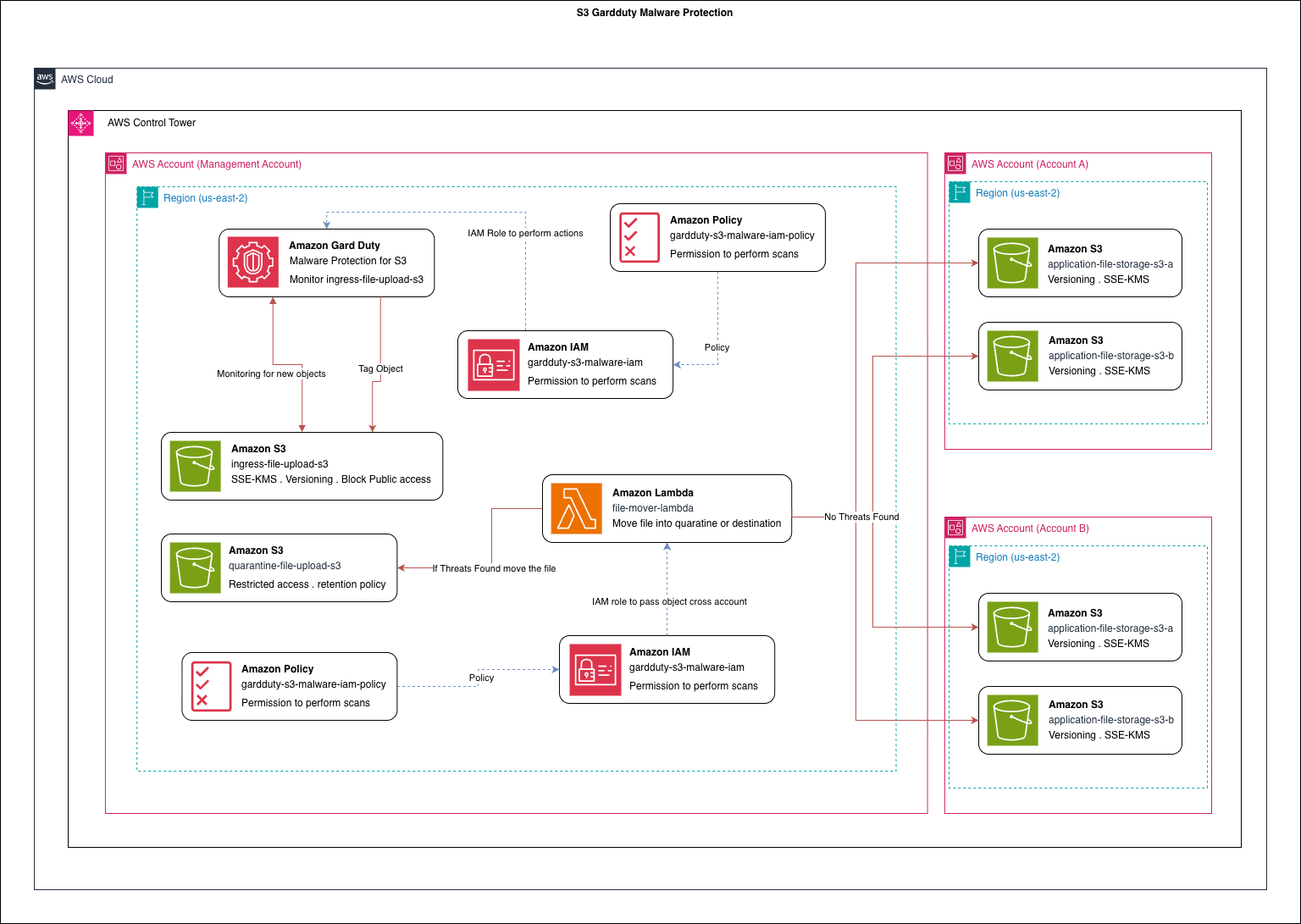
In this discussion, we will explore an ingress pattern for implementing malware detection using Amazon GuardDuty with Amazon S3.
Currently, GuardDuty Malware Protection for S3 has a limit of protecting 25 buckets per AWS account, and this limit cannot be increased. Because of this restriction, protecting a large number of application buckets directly is not practical. To solve this limitation, I designed an ingress pattern that allows us to scan uploaded files while keeping the number of protected S3 buckets small.
Ingress Bucket Design
In this design, we create a small set of S3 buckets that act as ingress buckets. All file uploads must go through one of these ingress buckets. Since GuardDuty protection is enabled only on these buckets, we stay within the 25-bucket limit while still scanning all uploaded files.
To further improve security and hide the internal architecture, we can place Amazon API Gateway in front of the upload process instead of directly exposing S3 using presigned URLs. With API Gateway we can:
- Add authentication and authorization
- Control access using API keys, IAM, or JWT tokens
- Hide the underlying S3 bucket structure from clients
However, this approach may limit some native S3 capabilities such as streaming uploads or direct multipart uploads. For this discussion, we will not focus on those limitations because the primary goal is to improve security for file upload services.
Why Use GuardDuty Malware Protection?
In a typical service implementation, organizations often add custom antivirus or malware scanning services. These solutions usually rely on third-party tools or self-managed scanning systems. While they work, they introduce additional operational overhead such as:
- Managing scanning infrastructure
- Updating malware signatures
- Monitoring and scaling the service
- Maintaining security patches
Using GuardDuty Malware Protection for S3 significantly reduces this operational burden. Since it is an AWS managed service, AWS handles:
- Infrastructure management
- Malware signature updates
- Service scaling
- Continuous improvements to detection capabilities
Additionally, AWS continuously improves GuardDuty and may introduce advanced detection features such as AI-assisted malware analysis.
File Processing Workflow
In this implementation, we reduce the number of S3 buckets that require protection and centralize scanning through the ingress buckets.
The workflow looks like this:
- A client uploads a file to an Ingress S3 bucket.
- GuardDuty Malware Protection automatically scans the object.
- If a threat is detected, the file is:
- Isolated
- Moved to a quarantine bucket
- If no malware is detected, the file is considered safe.
- Based on the object metadata, the file is then transferred to another S3 bucket in a different account, where it will be used by downstream services for further processing.
At the moment, this design does not include a retry or remediation mechanism for files flagged as malicious. In future improvements, I plan to add additional automation such as:
- Automated alerts
- Security notifications
- Optional re-scanning or manual review workflows
Multi-Account Architecture
To make this example more realistic and closer to a real enterprise environment, I used AWS Control Tower to create a multi-account organizational structure.
This approach reflects how many organizations structure their cloud environments, separating workloads into different accounts such as:
- Management account
- Account A
- Account B
In this implementation, the scanned and validated files are passed to an S3 bucket in another account where the application services run.
What This Series Will Cover
In this first discussion, I introduced the Ingress Pattern for secure file uploads with GuardDuty malware scanning.
In the next steps of this series:
-
I will publish a video walkthrough showing how to implement this architecture using the AWS Console.
-
After that, I will provide a Terraform script that can automatically deploy the entire environment.
-
This will allow anyone to reproduce the architecture easily and experiment with the pattern.
Comments